Introduction

Flask-Philo-Core is a Flask based framework that provides an out of the box structure for flask applications.
Motivation
Flask is an awesome web micro-framework that works great out of the box. Nevertheless, additional configuration and integration with complementary libraries are required in order to build complex applications.
There are multiple ways of building web applications using Flask. For example, you can use simple functions for views or use Class Based Views. Flask also provides multiple ways to bootstrap applications and is up to the user to structure a web application properly.
Flask-Philo-Core implements a common structure for web applications. Feel free to use it and extend it. We are willing to hear about your suggestions and improvements.
Features
- Common architecture for web applications.
- REST out of the box.
- Structured logging out of the box provided by json-log-formatter.
- Unit test support provided by pytest.
- Support for JSON validation provided by jsonschema.
- Support for CORS protection provided by flask-cors.
Python Support
Flask-Philo-Core supports python3.6 or higher. There are not plans to provide support for older python versions.
Quick Start
Installation
Flask-Philo-Core installation is pretty straightforward:
pip3 install Flask-Philo-Core
Creating a new project
Flask-Philo-Core includes the flask-philo-admin command line tool.
To quickly generate a new Flask-Philo project, navigate to the directory in which you want to create the project and run:
$ flask-philo-admin startproject
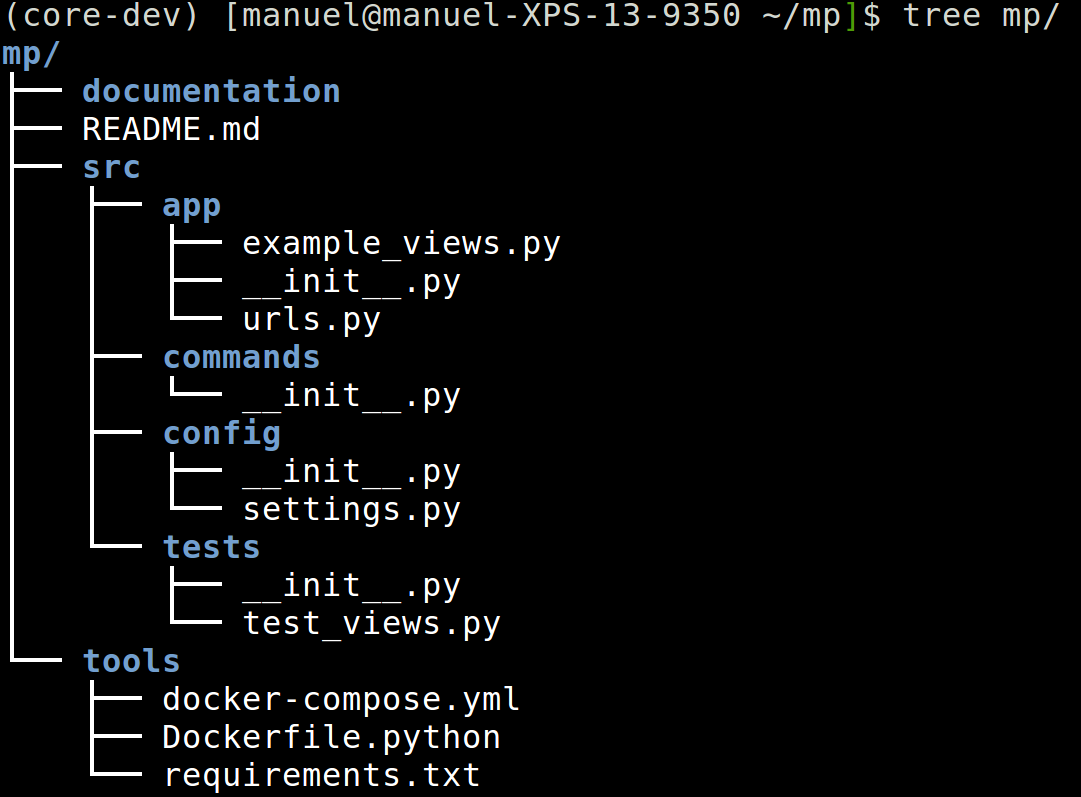
This command will create a folder which will contain the basic structure of a Flask-Philo-Core application, basic unit tests and configuration:

Folder structure
The following folder structure is created for the new project:
* README.md
* documentation
* src
    * app
        * __init__.py
        * urls.py
        * example_views
    * config
        * __init__.py
        * settings.py
    * console_commands
        * __init__.py
    * tests
        * __init__.py
        * test_views.py
* tools
    * docker-compose.yml
    * requirements.txt
    * Dockerfile.python
Start a Development Server
The following commands starts a development server:
cd src
flask-philo runserver

You can use the following command to test if the web app is working:
curl http://127.0.0.1:8080/example
